


HRequests Integration

This tutorial uses the powerful Python HTTP library HRequests.
Step 1: Install the library
shell
pip install hrequests[all]Step 2: Retrieve CA certificate and project credentials
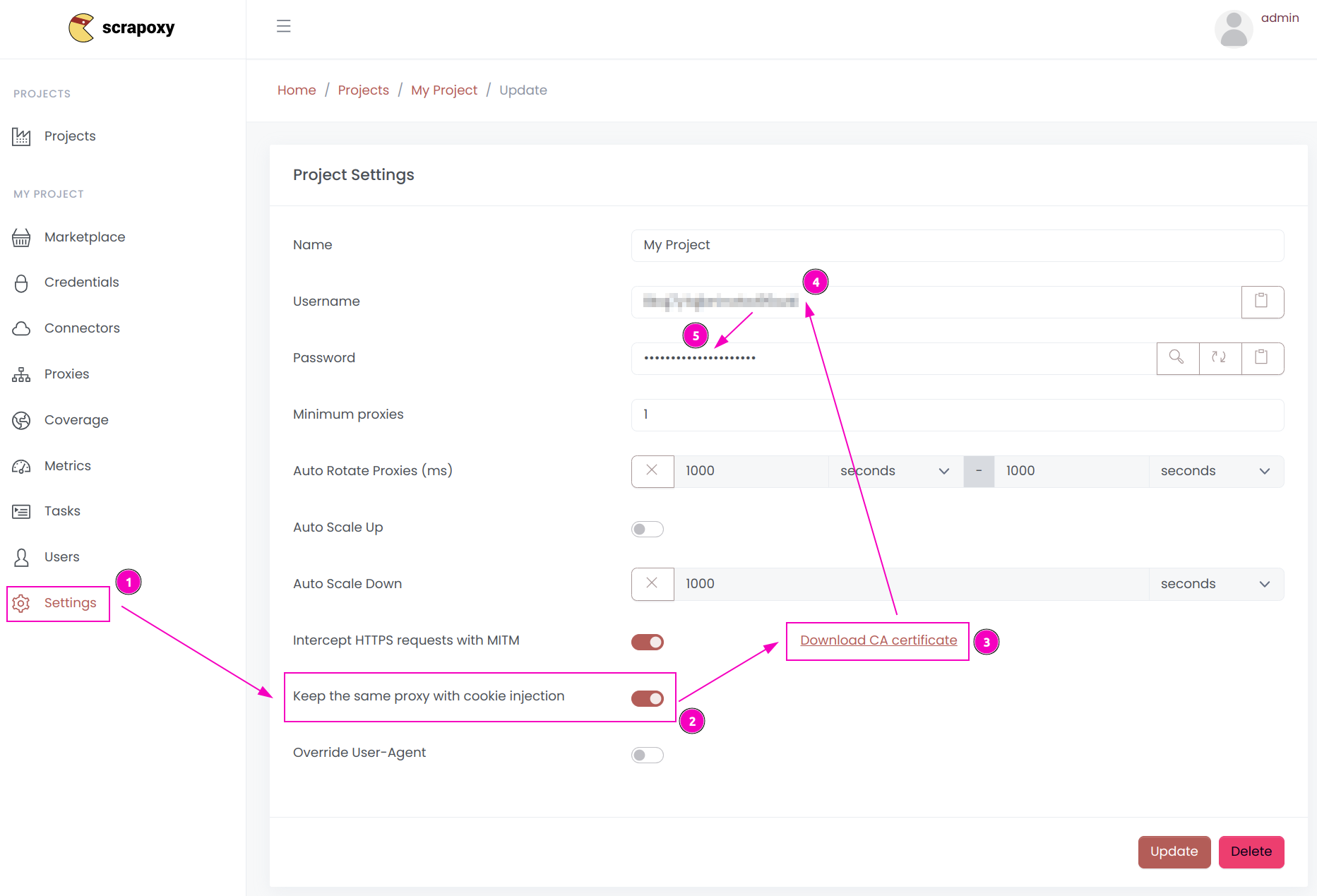
- Open ProxyHerd User interface, and go to the project
Settings; - Enable
Keep the same proxy with cookie injection; - Click on
Download CA certificateand save the fileproxyherd-ca.crt; - Remember the project's
Username; - Remember the project's
Password.
Step 3: Create and run the script
Create a file name hrequests.py with the following content:
python
import hrequests

proxy = "http://USERNAME:PASSWORD@localhost:8888"

session = hrequests.Session()

r = session.get(
    "https://api.ipify.org?format=json",
    proxy=proxy,
    verify=False
)

session.close()

print("proxy instance:", r.headers["x-scrapoxy-proxyname"])

print(r.json())
Replace USERNAME and PASSWORD by the credentials you copied earlier.
INFO
All requests made in the same session will use the same proxy instance.
Run the script:
shell
python hrequests.py